
Meet the Palette Generator: Your New Favorite Color Sidekick
If you’ve ever stared at a blank canvas thinking, “What colors should I use?” — this update is for you.
Our new Palette Generator turns color theory and smart algorithms into a simple, friendly tool that helps you create beautiful, production‑ready color palettes in seconds. No more jumping between random color sites and your CSS. Now it all happens in one place.
Until now, the Color Converter focused on taking colors you already had and turning them into clean CSS variables.
That’s still there — but now you can also generate palettes from scratch using:
- Classic color harmonies
- Smooth gradients
- Thoughtful tints & shades
- A full Material Design scale
- And even random palettes for inspiration
Every generated palette plugs directly into the same workflow you already know: history, naming, descriptions, and CSS export.
Color harmony is powerful, but doing it by hand is… not fun.
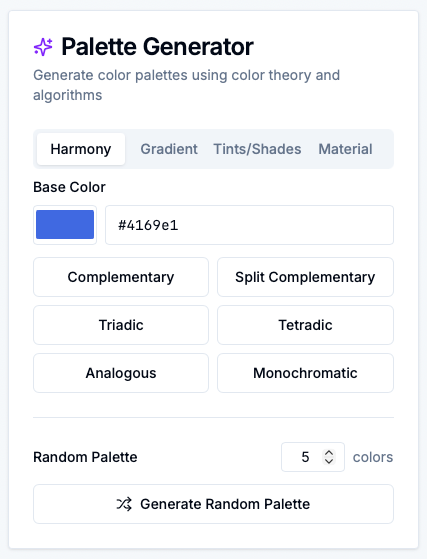
In the Harmony tab, you pick a single base color and let the generator handle the rest. With one click, you can create:
- Complementary – Perfect for strong contrast (e.g. CTA button vs background)
- Split Complementary – A safer, more flexible contrast scheme
- Triadic – Three colors evenly spaced around the color wheel
- Tetradic – Four colors for richer, more complex palettes
- Analogous – Soft, natural combinations (great for UI themes)
- Monochromatic – Light and dark variations of a single hue
You focus on the vibe. The tool takes care of the math.
When you generate a harmony:
- It appears instantly in the right‑side results area
- You can rename the palette, add descriptions, delete or add colors
- It’s automatically saved to history, so you can come back to it later
Gradients can be beautiful — or a mess.
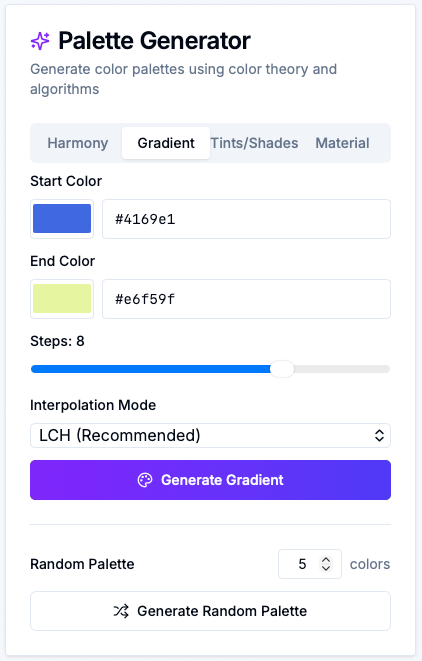
The Gradient tab helps you build smooth, consistent transitions between two colors:
- Choose a start and end color
- Pick how many steps you want (3–10)
- Select the interpolation mode:
- LCH / LAB – perceptually smooth, ideal for modern UIs
- HSL – hue‑based transitions
- RGB – classic but less visually uniform
Click “Generate Gradient”, and you get a ready‑made palette that:
- Shows up as color cards (with HEX/RGB/HSL formats)
- Can be exported immediately as CSS variables
- Gets saved to history so you can reuse it across projects
No guessing, no fiddling, just gradients that feel professional.
Real design systems need more than just “one good blue”.
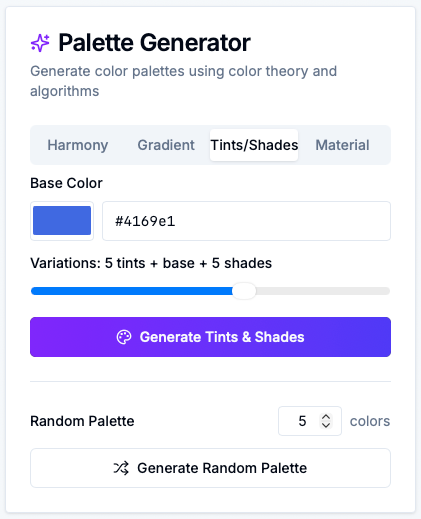
In the Tints/Shades tab, you:
- Pick a base color
- Choose how many variations you want on each side (tints & shades)
With one click, you get:
- Lighter tints for backgrounds and subtle elements
- Your base right in the middle
- Darker shades for text, borders, and emphasis
This is perfect if you’re:
- Building a design system from scratch
- Tweaking an existing brand color into a full usable scale
- Making your UI feel more polished and consistent
Love the idea of Material Design’s color system but don’t want to hand‑craft all the steps?
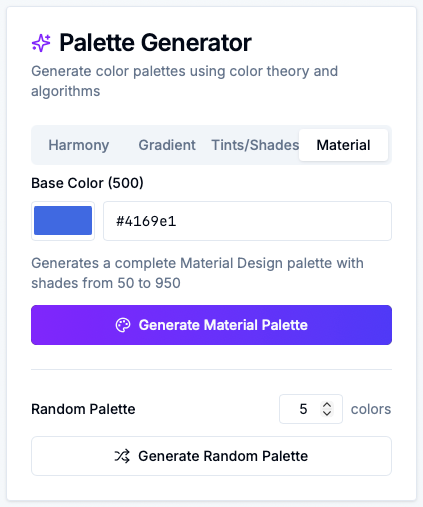
The Material tab lets you:
- Pick a single base color (treated as the 500 level)
- Generate a complete Material‑style palette from
50to950
You instantly get 11 shades you can map to:
--primary-50,--primary-100, …--primary-950- Light, dark, hover, focus, and disabled states
- Component backgrounds, borders, and text
It’s a design‑system‑ready color scale, tailored to your brand.
Sometimes you don’t know what you want until you see it.
At the bottom of the generator, the Random Palette section lets you:
- Choose how many colors you want (3–10)
- Click “Generate Random Palette”
Behind the scenes, we use smart distribution of hues, saturation, and lightness so the result actually looks like a usable palette — not a chaotic rainbow.
Perfect for:
- Quick inspiration
- Early‑stage mood exploration
- Breaking out of your usual color habits
The best part? The Palette Generator doesn’t feel like a separate tool — it’s fully wired into the existing Color Converter experience.
When you generate a palette, you can:
-
See it as color cards
Each color shows:- Name and CSS variable
- HEX, RGB, and HSL (with alpha support)
- One‑click copy for each format
-
Rename and annotate
- Click the palette name to rename it
- Add descriptions to each color (e.g. “primary button”, “muted background”)
- Save your changes so they persist in history
-
Edit without fear
- Delete colors with a confirmation dialog
- Add new colors via the “Add Color” card
- Keep everything synced with your history
-
Export as CSS variables
- Switch between HEX, RGB, and HSL tabs
- Copy a complete, ready‑to‑paste variables block for your project
It’s not just a generator — it’s a full idea → palette → production CSS pipeline.
Ready to give it a spin?
Head over to our Color Converter & Palette Generator (opens in a new window) and:
- Open the Palette Generator card in the left column
- Try a harmony, gradient, tints/shades, or Material palette
- Generate a few random palettes for fun and save your favorites
- Rename, annotate, and export them as CSS variables
We built this feature to help you move faster, design smarter, and feel more confident about your color choices.
If you have ideas for what we should add next — accessibility overlays, image‑based palettes, advanced harmonies, or something totally different — we’d love to hear from you.
Happy palette‑building! 🎨